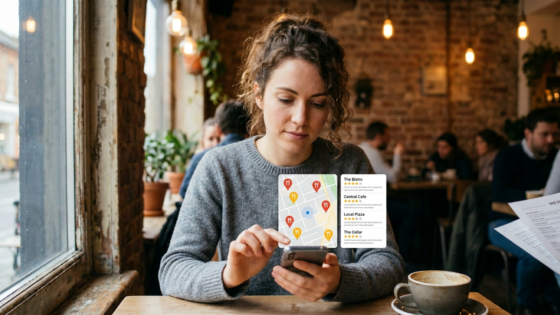
A hungry customer pulls out their phone two blocks from your restaurant, types “Chinese food near me,” and your restaurant doesn’t appear. They walk into your competitor’s place instead. You never even knew you lost that customer.
This happens more often than most restaurant owners realize. According to research cited by Waitly, 46% of all Google searches have local intent, and most of those searches result in a visit within a day. If your restaurant is invisible in these results, you’re quietly losing revenue every single day.
The good news? The reasons are usually fixable. Here are the seven most common culprits — and exactly what to do about each one.
Key Takeaways
- Your Google Business Profile is your digital front door — an incomplete or unverified profile is the #1 reason restaurants disappear from local search.
- Inconsistent business information across the web confuses Google — your name, address, and phone number must match everywhere.
- Reviews, fresh content, and mobile-friendly websites all factor into local rankings — it’s not just about being listed, it’s about being active.
How Google Decides Which Restaurants Show Up Locally
Before diving into the fixes, it helps to understand what Google is actually looking for. Google uses three main signals to rank local businesses.
The Three Ranking Factors: Relevance, Distance, Prominence
| Factor | What It Means | What You Control |
|---|---|---|
| Relevance | How well your profile matches what someone is searching for | Categories, descriptions, menu items, keywords on your site |
| Distance | How close the searcher is to your location | Accurate address, correct map pin placement |
| Prominence | How well-known and trusted your restaurant appears online | Reviews, backlinks, citations, website quality |
You can’t control distance, but you can significantly influence relevance and prominence. That’s where most of the fixes live.
What the “Local Pack” Is and Why It Matters
The “local pack” is the box of three map-based results that appears at the top of Google when someone does a local search. As SpotOn explains, securing one of these three positions is a massive visibility boost. Most diners never scroll past this section — if you’re not in the local pack, you’re effectively invisible to the majority of searchers.
Reason #1: Your Google Business Profile Is Incomplete or Unverified
This is the single most common problem, and it’s the easiest to fix.
Why It Matters
Your Google Business Profile (GBP) is what populates the local pack, Google Maps, and the sidebar that appears when someone searches your restaurant name. If you haven’t claimed it, or if it’s only partially filled out, Google has very little information to work with — and it will show competitors who have complete profiles instead.
How to Fix It
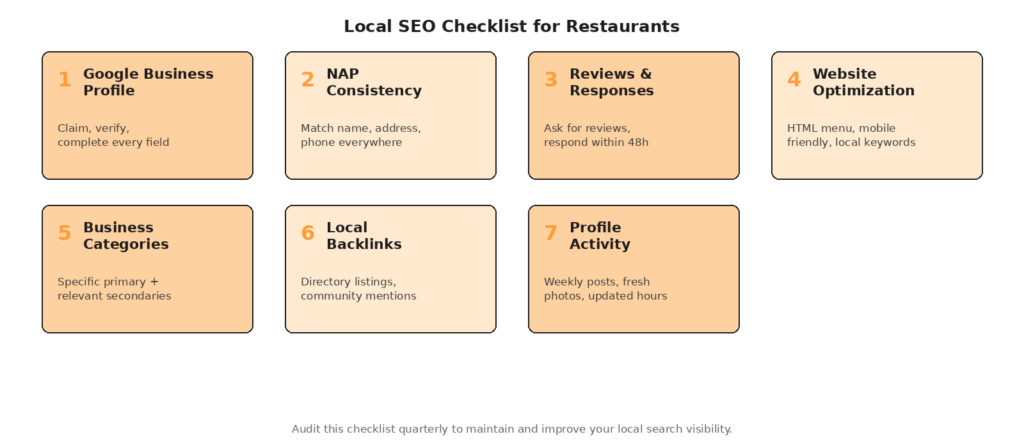
Go to google.com/business and claim your profile if you haven’t already. Then complete every field: business name (exactly as it appears on your signage), full address, phone number, website, hours of operation, cuisine categories, and a detailed business description. Add professional photos of your food, interior, and exterior. According to Malou, restaurants that fully complete their Google Business Profiles see up to 70% more engagement.
Reason #2: Inconsistent NAP (Name, Address, Phone) Across the Web
Google cross-references your business information across hundreds of directories, review sites, and social profiles. If there are discrepancies, it gets confused.
How Inconsistencies Happen
It’s often subtle: your address says “6th Ave” on Google but “Sixth Avenue” on Yelp. Or your phone number has a different format across platforms. Maybe you changed locations two years ago but forgot to update your DoorDash listing. According to BrightEdge, NAP consistency can impact a site’s local search performance by as much as 16%.
How to Fix It
Create a master document with your exact business name, address, and phone number. Then audit every platform where your restaurant appears — Google, Yelp, Facebook, TripAdvisor, Apple Maps, DoorDash, Uber Eats, your own website — and make them match exactly. We cover this in more detail in our guide to restaurant operations. For a deeper dive on NAP, see our article on NAP consistency (note: this article is part of the same batch — link after publication).
Reason #3: Not Enough (or Not Enough Recent) Reviews
Reviews are one of the strongest signals Google uses to determine prominence. A restaurant with 200 recent reviews will almost always outrank one with 15 reviews from two years ago, even if the food is identical.
The Review Velocity Problem
It’s not just about total count — Google also looks at how frequently new reviews come in. A steady flow of reviews signals that your restaurant is active and relevant. As GatherUp’s statistics show, 32% of consumers would write more reviews if businesses simply asked them to.
How to Fix It
Make leaving a review frictionless. Add a QR code on your receipt or table tent that links directly to your Google review page. Train your staff to casually mention it: “If you enjoyed your meal, we’d appreciate a quick Google review — it really helps us.” Follow up with an email or text within 24–48 hours of their visit. Respond to every review you receive — this engagement itself boosts your local ranking.
Reason #4: Your Website Isn’t Optimized for Local Search
Even if your Google Business Profile is perfect, your website still matters. Google looks at your site to confirm and expand on the information in your profile.
Common Website Mistakes
The most frequent issues for restaurant websites include: using your menu only as an image or PDF (which Google can’t read), having no mention of your neighborhood or city in your page text, missing or incorrect contact information, and slow load times on mobile devices. As Food & Beverage Magazine recommends, restaurants should avoid PDF menus and use HTML text instead for better Google indexing.
How to Fix It
Ensure your website includes your full address and phone number in text (not just an image), ideally in the footer on every page. Write your menu in HTML, not just as an uploaded PDF. Include your neighborhood and city name naturally in your homepage copy and page titles. Test your site on mobile — if it’s slow or hard to navigate on a phone, you’re losing both customers and search rankings.
Reason #5: Wrong or Missing Business Categories
Your GBP categories tell Google what kind of restaurant you are. Choosing vague or incorrect categories reduces your chances of appearing for relevant searches.
How to Fix It
Select the most specific primary category that matches your restaurant (e.g., “Chinese restaurant” rather than just “restaurant”). Add relevant secondary categories like “Takeout restaurant,” “Delivery restaurant,” or “Dim sum restaurant.” The more precisely Google understands what you serve, the better it can match you to the right searches.
Reason #6: No Local Backlinks or Citations
Backlinks — links from other websites to yours — are a strong trust signal for Google. Local backlinks from neighborhood blogs, community organizations, or local news outlets are especially valuable.
How to Build Local Authority
Get listed in local business directories beyond just Google and Yelp. Participate in community events and get mentioned in local press. Partner with nearby businesses for cross-promotions. If a local food blogger writes about your restaurant and links to your site, that’s gold for your local search ranking. Even being listed on your local chamber of commerce website helps.
Reason #7: You’re Not Active on Your Profile
A Google Business Profile isn’t a “set it and forget it” tool. Google rewards businesses that stay active by posting updates, adding new photos, and responding to reviews. As Beyond Menu’s 2026 guide advises, aim for at least one new GBP post per week — posts with photos and clear calls to action earn the most engagement.
How to Fix It
Post weekly updates about specials, events, or seasonal menu changes. Add fresh photos monthly. Respond to every review within 48 hours. Update your hours for holidays and special closures. These small, consistent actions compound over time and tell Google your business is thriving.
Frequently Asked Questions
How long does it take to show up in “near me” searches after fixing these issues?
Most changes take 2–4 weeks to reflect in Google’s rankings, though some improvements (like completing your Google Business Profile) can have an impact within days. Review-driven improvements tend to accumulate gradually — expect meaningful ranking changes within 45–60 days of consistent effort.
Do I need a website to rank in local search, or is a Google Business Profile enough?
A Google Business Profile alone can get you into the local pack, but having a website significantly strengthens your presence. It gives Google more content to index, provides another source to confirm your NAP information, and lets you capture customers who want to browse your menu or place an order before visiting.
Does responding to reviews actually help my Google ranking?
Yes. Google has confirmed that review responses factor into local search visibility. Active engagement signals that your business is attentive and trustworthy, which contributes to higher placement in local results.
Being found online is step one. Capturing every customer who calls is step two. Tunvo’s AI voice agent answers every call — in English, Mandarin, and more — and sends orders straight to your POS. No more missed calls, no more lost revenue. Book a demo or start your 15-day free trial.