You know the scenario: a customer raves about the food, tells you it was the best meal they’ve had in months, promises to leave a five-star review… and then never does. They didn’t forget because they stopped caring. They forgot because life got in the way — and leaving a Google review requires too many steps.
That gap between a customer’s intention and their action is where QR codes come in. By placing a scannable code at the right moment — when the experience is still fresh — you can turn satisfied diners into active reviewers with a single scan. In our work with restaurant owners across New York, we’ve seen this one tactic consistently outperform every other review generation strategy.
Key Takeaways
- QR codes eliminate the friction that stops happy customers from leaving reviews — one scan takes them directly to your Google review form.
- Placement and timing matter more than design — check presenters and table tents consistently outperform other locations.
- Restaurants using QR codes for reviews report 2–4x their normal review volume within the first month of implementation.
Why Most Restaurants Struggle to Get Reviews
The problem isn’t that customers don’t want to leave reviews. It’s that the process has too many steps.
The Friction Problem
Without a QR code, here’s what a customer has to do: open their phone, go to Google Maps or search, find your restaurant, navigate to the review section, tap “write a review,” type their thoughts, and submit. That’s at least six steps — and most people abandon the process somewhere around step three. As Testimonial Donut reports, businesses that use QR codes to streamline this process often see their review volume increase by 40–200%.
Why Reviews Are Worth the Effort
According to BrightLocal’s 2026 consumer survey, 93% of consumers have made a purchase decision after reading reviews. For restaurants specifically, Google reviews are the most influential platform — GatherUp data shows that 56% of consumers use Google to search for restaurant reviews, making it the most trusted source for dining decisions.
How to Create a Google Review QR Code (Step by Step)
The setup takes about 10 minutes. Here’s the process.
Step 1: Get Your Google Review Link
Sign in to your Google Business Profile. Look for the “Get more reviews” section and click “Share review form.” This gives you a direct URL that takes customers straight to a blank review form for your business. Copy this link.
Step 2: Generate Your QR Code
Paste your Google review link into any QR code generator. Free options include QR Code Generator (qr-code-generator.com), QRCodeChimp, or Scanova. For a restaurant setting, choose a high-contrast design — black on white is the most reliable for scanning in varying light conditions. Make sure the QR code is at least 2 x 2 centimeters (about 0.8 x 0.8 inches) for easy scanning.
Step 3: Design Your Call-to-Action
The QR code alone isn’t enough — you need a clear, friendly prompt alongside it. Keep it simple and specific:
| Effective CTAs | Why They Work |
|---|---|
| “Enjoyed your meal? Scan to share your experience on Google” | Friendly, non-pushy, tells them what the code does |
| “Help others discover us — scan to leave a quick review” | Frames it as helping the community, not the business |
| “Your feedback helps us improve — 30 seconds, one scan” | Sets time expectation low, reducing perceived effort |
Where to Place Your QR Code for Maximum Impact
Location is everything. The best placement catches customers when they’re happiest and already have their phones out.
High-Performing Placements
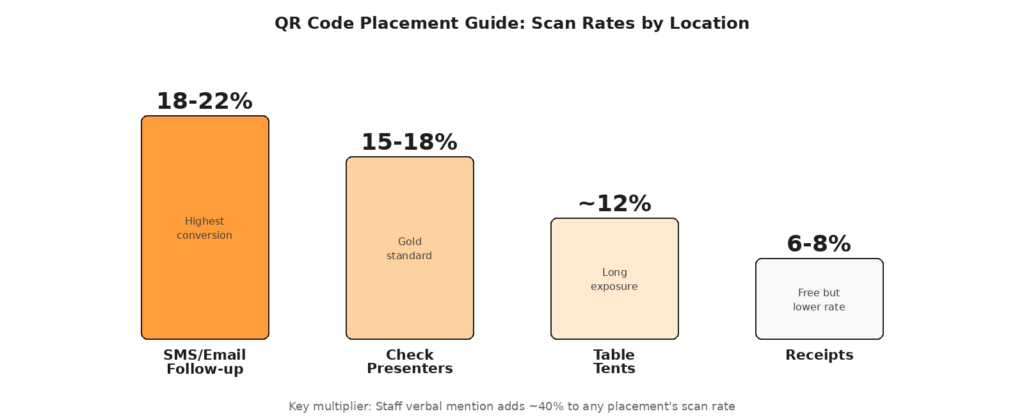
According to MapLift’s research across 200+ restaurants, here’s how different placements perform in terms of scan rates:
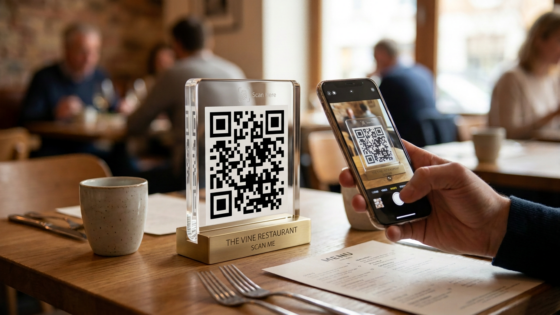
Check presenters (15–18% scan rate): This is the gold standard. When customers receive their bill, they’re wrapping up a (hopefully) great experience and already reaching for their phones. Tuck a small card with the QR code and a brief CTA right inside the check folder.
Table tents (12% scan rate): Visible throughout the entire dining experience, table tents give customers time to notice and act on the code. One restaurant test found table tents achieved double the scan rate of receipt-only placements.
Receipts (6–8% scan rate): Print the QR code directly on your receipt paper. While the scan rate is lower, this is essentially free — you’re already printing receipts.
SMS/email follow-up (18–22% scan rate): If you collect customer contact information through reservations or a loyalty program, a follow-up message 24–48 hours after their visit with the QR code or review link can be extremely effective.
The Verbal Boost That Changes Everything
The single biggest factor in QR code scan rates isn’t placement — it’s whether your staff mentions it verbally. Research cited by MapLift shows that a server verbally mentioning the QR code increases scan rates by approximately 40%. A simple, casual script works best: “Here’s your check — and if you enjoyed your meal, this QR code goes straight to our Google page if you’d like to share your experience. It takes about 30 seconds.”
What to Expect: Realistic Timelines
Don’t expect an avalanche on day one. Here’s a realistic picture of what QR-driven review growth looks like.
Month-by-Month Progression
Weeks 1–2: You’ll see an initial boost as early adopters scan the code. Expect 2–4x your normal review rate during this period.
Weeks 3–4: The rate stabilizes as the novelty fades, but it settles at a consistently higher level than before — typically 1.5–2x your baseline.
Months 2–3: With staff consistently mentioning the QR code and multiple touchpoints in place, review volume typically reaches 3–4x the pre-QR baseline. More importantly, Google’s algorithm begins recognizing the increased review velocity and rewards you with better local search positioning. According to MapLift, ranking improvements typically appear 45–60 days after implementation.
Important Rules: What You Can and Can’t Do
Before you start asking every customer for a five-star review, there are legal and platform rules to be aware of.
Google’s Guidelines
Google allows you to ask customers for reviews. However, you cannot ask for reviews with a specific star rating (e.g., “please give us 5 stars”), and you cannot selectively ask only happy customers while discouraging unhappy ones from posting. Your QR code and request should be open to all customers, and the prompt should be neutral.
The FTC’s Fake Reviews Rule
The FTC’s Consumer Review Rule, which took effect in October 2024, prohibits businesses from offering incentives conditioned on leaving a positive review. You can offer a small incentive for leaving a review (e.g., “leave us a review and get 10% off your next visit”), but you cannot require the review to be positive. Penalties for violations can reach up to $51,744 per occurrence, so it’s important to get this right.
What This Means Practically
Keep your ask simple and honest. “If you enjoyed your meal, we’d love a review” is fine. “Leave us a 5-star review for a free dessert” is not. The goal is to make it easy for genuinely satisfied customers to share their experience — not to manufacture fake praise.
Making It Sustainable for Your Team
The best review strategy fails if your staff doesn’t follow through consistently.
Train Your Team in 15 Minutes
Hold a brief team meeting to explain why reviews matter to the business. Share the numbers — that a one-star improvement can mean 5–9% more revenue — and make it clear this benefits everyone, including tips and job security. Give servers a simple, casual script (not a rigid one) and let them adapt it to their personality. The more natural it feels, the more likely they are to actually say it.
Track and Celebrate Progress
Monitor your Google Business Profile weekly to see how many new reviews come in. Share the wins with your team — “We got 12 new five-star reviews this week!” builds momentum. Some restaurants even run friendly competitions among staff to see who can generate the most reviews (without violating any guidelines about soliciting specific ratings, of course).
Frequently Asked Questions
Do I need a paid QR code generator?
No. Free generators work perfectly for a static Google Review QR code. Paid “dynamic” QR codes let you change the destination URL later without reprinting, and they provide scan tracking analytics. For most single-location restaurants, a free static code is sufficient to get started.
Will this work for Yelp and other platforms too?
Yes, the same approach works for any review platform. However, Google reviews should be your priority because Google is the dominant platform for restaurant discovery — used by 56% of consumers searching for restaurant reviews. Focus your QR code on Google first, then consider adding Yelp or TripAdvisor codes as secondary touchpoints.
What if I start getting negative reviews through the QR code?
That’s actually healthy. A mix of ratings looks more authentic than a perfect 5.0 (which many consumers find suspicious). What matters is your response to negative feedback — a professional, empathetic reply can turn a negative review into a trust-building moment. Check out our review response templates for ready-to-use replies.
More reviews bring more customers — and more customers mean more phone orders. Make sure every call gets answered. Tunvo’s AI voice agent handles every call with consistent accuracy and sends orders straight to your POS. Book a demo or start your 15-day free trial.