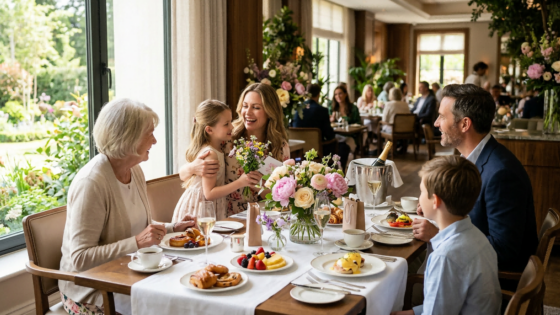
Mother’s Day is the busiest restaurant day of the year — not one of the busiest. The busiest. It’s the highest-grossing Sunday of the year for restaurants, surpassing even football Sundays, with full-service restaurants seeing average ticket sizes about 32% higher than any other weekend. That’s the opportunity. The challenge is that the same factors that make Mother’s Day so lucrative also make it genuinely difficult to run: large groups, lingering tables, last-minute reservations, and a phone that will not stop ringing.
This guide focuses on the operational side — specifically how to structure your reservations, staff your floor, and make sure your phone coverage doesn’t become the weakest link in an otherwise well-planned day.
Key Takeaways
- Mother’s Day is the busiest dining day of the year — more demanding than Valentine’s Day, Super Bowl Sunday, or any other holiday.
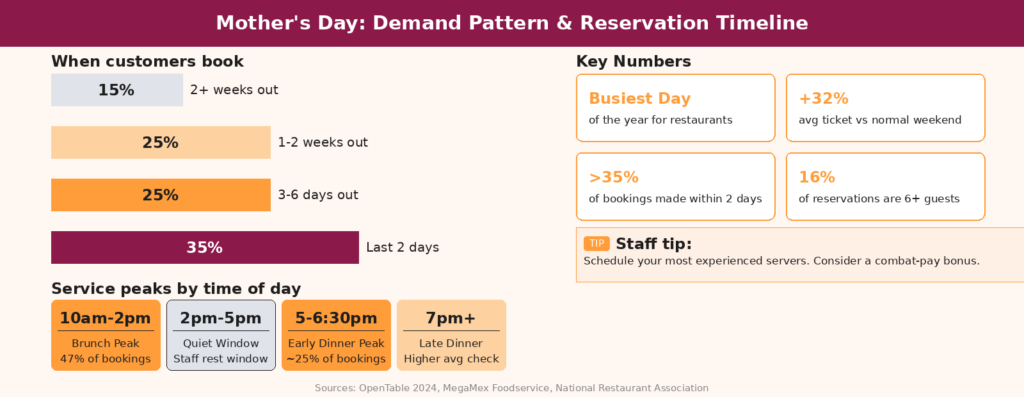
- Over 35% of bookings come within two days of the holiday — last-minute demand is real and must be managed, not ignored.
- Brunch dominates (11am–2pm), but early dinner (5–6pm) is your second peak — staff and menu both need to cover both windows.
- Phone calls are the most expensive bottleneck — on a day when staff attention is maximally divided, missed calls cost real revenue.
Understanding the Mother’s Day Demand Pattern
When Your Customers Book — and When They Show Up
One of the most operationally significant facts about Mother’s Day is its booking pattern. Over 35% of Mother’s Day reservations are made within two days of the holiday. That means even if your weekend books up for early slots, you’ll still field a substantial volume of calls on Thursday, Friday, and Saturday from customers hoping to get in. Managing that late-booking window without losing your composure — or your customers — requires a clear policy and a communication system that can handle volume.
On the day itself, 47% of Mother’s Day transactions happen during brunch, with 10am being an increasingly popular reservation time. Dinner follows, with early evening (5–6pm) accounting for nearly a quarter of all bookings — families with young children or elderly parents who prefer to eat early and avoid the late rush. Your staffing, prep, and kitchen timing must be built around both peaks, not just one.
The Party Size Reality
More than 70% of Mother’s Day reservations are for parties of 2–4 guests, but groups of 6 or more make up nearly 16% of bookings — a meaningfully higher share than a typical Sunday. That means your table configuration matters. Before Mother’s Day weekend, reconfigure your dining room to favor 4-tops and 6-tops. Have a clear plan for combining tables for larger groups. Restaurant operators recommend configuring the room with more six- and eight-top tables but saving some space for smaller parties, and ensuring an adequate supply of clean highchairs and children’s activities — nearly 60% of Mother’s Day diners bring children under 18.
Structuring Your Reservations for Mother’s Day
Stagger Seatings — Don’t Stack Them
The most common Mother’s Day disaster happens in the first hour of service: too many reservations arriving at the same time, the kitchen falling behind, and a cascade of frustrated tables. The solution is staggered reservation windows. Instead of offering open seating at 11am, 12pm, and 1pm, structure your brunch as 10:30am, 11:15am, 12:00pm, and 12:45pm slots. This smooths kitchen output, gives servers time to settle each table before the next arrives, and prevents the host stand from facing six groups simultaneously.
For both brunch and dinner, offer two-hour time slots with cushion built in, since most customers will want to linger and enjoy their meal — plan accordingly rather than trying to force rapid table turns. On Mother’s Day, rushing families creates bad reviews. A 15-minute buffer between staggered seatings is operationally sound and professionally respectful.
How Many Reservations to Take
For Mother’s Day, it may be in your restaurant’s best interest to open more tables for reservations than you normally would — but you need to be strategic about how you space them so that 15 groups don’t arrive simultaneously and overwhelm your staff. A practical structure: reserve 70% of your dining room capacity through advance bookings and keep 30% for walk-ins and waitlist management. This preserves your flexibility without sacrificing the revenue certainty that pre-booked tables provide.
Set a clear reservation cutoff — Thursday evening at 9pm is a reasonable window. After that, all availability switches to a waitlist. Communicate this clearly on your website, your social profiles, and in your outgoing phone message. Customers respect a clear policy far more than an ambiguous “call us and see.”
The Waitlist Strategy
Even after you’ve closed reservations, a well-managed waitlist can capture significant additional revenue from the 35%+ of customers who book at the last minute. Take waitlist names and phone numbers beginning the week before. On Mother’s Day morning, work through the list as tables free up — some reserved groups will run late, others will cancel, and walk-ins who arrive early can also feed into the waitlist queue. Offering your waitlist online — so last-minute planners can get in line before arriving at your restaurant — also frees up congestion at the host stand on the day itself.
Menu Strategy: Simpler Is Faster
The Case for a Prix Fixe
A special Mother’s Day menu for dinner shouldn’t hold back — but since it’s so busy, it’s wise to pair down offerings to a special prix fixe to prevent your kitchen and inventory from getting overwhelmed. A three-course prix fixe at a set price simplifies ordering decisions for guests, allows your kitchen to batch-prep with high efficiency, and makes ticket times far more predictable than an à la carte rush where every table orders differently.
Research from the National Restaurant Association finds that 32% of moms would be more enticed to dine at a restaurant offering a special Mother’s Day menu — the prix fixe signals that the restaurant has prepared intentionally for the occasion, which matches the emotional context of the day.
| Time Window | % of Mother’s Day Bookings | Operational Priority |
|---|---|---|
| 10:00am – 2:00pm (Brunch) | ~47% | Full kitchen team, staggered seatings, brunch-specific prep |
| 2:00pm – 4:30pm (Afternoon) | ~10% | Lighter service, good opportunity for kitchen rest before dinner |
| 5:00pm – 6:30pm (Early Dinner) | ~25% | Second peak — families with children and elderly guests |
| 7:00pm+ (Late Dinner) | ~18% | Adult children taking parents out, typically higher check average |
Staffing: Your Most Important Decision
Schedule Your Best People
Mother’s Day weekend is the time to schedule your most experienced servers, and it may not be the best weekend to put new staff on the floor. Experienced servers move faster, handle complex tables better, and manage difficult guests with less intervention from management — all of which are table stakes on a day when every table is a family celebration with high emotional expectations. If new staff must work, route them to support roles: food running, bussing, dessert delivery — tasks that keep them involved without putting them in direct guest-management positions on the busiest day of the year.
The Mother’s Day Staffing Paradox
Mother’s Day creates a specific staffing tension that doesn’t exist on other holidays: many of your staff members also have mothers. Schedule your Mother’s Day team a month in advance, ask explicitly about conflicts early, and consider giving employees who work the full shift a meaningful bonus — either cash, an extra day off, or a take-home dessert. Express appreciation to your team and consider giving workers a combat-duty bonus — whether cold cash, an extra day off later, or a special dessert to take home. The staff who show up and give their best on the hardest day of the year deserve recognition.
The Phone Problem: Why Mother’s Day Calls Are Uniquely Difficult
Volume Hits Before You’re Ready
In the days before Mother’s Day, your phone rings with reservation requests, menu questions, dietary accommodation inquiries, group size confirmations, and calls from customers asking if you’re open. On the day itself, the calls shift: confirmations, late-arrival notices, last-minute walk-in checks, and takeout orders from customers who couldn’t get a reservation.
All of this happens while your staff is at maximum operational load. A server fielding a call at the host stand is a server not turning a table. A manager answering repeat availability questions is a manager not managing the floor. And when a call rings out — when nobody picks up because both hands are full — that reservation goes somewhere else.
How AI Voice Changes the Equation
Tunvo’s AI voice agent handles inbound calls in both English and Mandarin, takes reservation requests, answers questions about your menu and hours, and logs everything directly to your MenuSifu POS. On Mother’s Day, this means your staff can focus entirely on the guests in front of them while the AI manages the phone queue. Customers on hold or reaching voicemail during your busiest hours can instead speak to a natural-sounding AI that gives them the information they need or takes their booking immediately.
See Tunvo’s pricing here. Setup takes about 30 minutes, and a 15-day free trial gives you time to test it before Mother’s Day weekend arrives. The Tunvo team can walk you through getting your phone menu and responses configured for the holiday.
Special Touches That Turn First-Time Guests Into Regulars
Mother’s Day is your highest-traffic day for first-time visitors — families who don’t typically dine out often, or who are trying your restaurant because it was the only table available when they looked. This is your best acquisition opportunity of the year. A few low-cost touches that have proven impact:
- Personalized table notes — if a reservation includes a “celebrating Mother’s Day” note, a handwritten card on the table when they arrive signals that you were expecting and welcoming them specifically.
- A complimentary small gift for mom — a single flower, a small box of chocolates, a fortune cookie with a personalized New Year message if you’re a Chinese restaurant. 42% of customers say they would choose a restaurant offering free add-ins for Mom, like special cocktails, desserts, flowers, or a small gift.
- Offer to take a family photo — this is a genuine service that most families appreciate. Offering it proactively rather than waiting to be asked signals attentiveness.
- A return visit incentive in the check presenter — a “Thank you for celebrating with us” card with a 10% offer valid Monday through Thursday, when your restaurant needs the traffic most.
Frequently Asked Questions
What time slots should a restaurant prioritize for Mother’s Day reservations?
Prioritize the 10:30am–1pm brunch window and the 5–6pm early dinner window — those are where the bulk of bookings concentrate. Over 40% of Mother’s Day bookings fall between 11am and 2pm, with a significant secondary peak in early evening from families with young children. Staff and inventory for both peaks rather than assuming one will dominate.
How should a restaurant handle cancellations on Mother’s Day?
Require a credit card to hold the reservation and clearly communicate a cancellation policy — 24 hours notice is reasonable. Consider a small deposit for parties of 6 or more. This dramatically reduces day-of no-shows and allows you to fill cancelled slots from your waitlist. Be consistent in how you enforce the policy; inconsistency creates resentment among both staff and guests.
Should a Chinese restaurant offer Mother’s Day specials, or stick with the regular menu?
Offering a dedicated Mother’s Day set menu typically outperforms keeping the standard menu unchanged. Families making a special occasion decision respond to the signal that your restaurant has prepared something specifically for the occasion. A 3-course set menu at a premium price point also simplifies kitchen production on your busiest day, which means more consistent food and faster service — both of which drive positive reviews.
What’s the most effective way to handle the phone surge in the week before Mother’s Day?
The week before Mother’s Day, your phone should be treated as a reservation channel, not a general inquiry line. If possible, have one dedicated person answering calls during your peak call hours (typically 11am–2pm and 5–8pm the week before the holiday). For restaurants that can’t staff that role, an AI voice agent that handles inbound calls and takes reservation requests automatically — and syncs them to your POS — removes the bottleneck entirely. The worst outcome is a ringing phone that nobody answers during your highest-conversion booking window of the year.
—
Mother’s Day is the year’s most valuable day for table reservations — and your phone is your reservation system. Every call that rings out in the days before the holiday is a table that fills somewhere else. Tunvo answers every call in English and Mandarin, takes bookings, and syncs to your MenuSifu POS automatically.
Book a Demo or Start Your 15-Day Free Trial.