When we designed the phone ordering flow for Tunvo’s AI voice agent, one thing became immediately clear: most customers who call a restaurant to place a takeout order have already done their research on Google. They’ve seen your profile, checked your hours, looked at a menu photo or two, and decided you’re worth calling. The Google Business Profile (GBP) is not just a listing — it’s the pre-call sales conversation that determines whether the phone rings at all.
For restaurants whose takeout business is a core revenue driver, an under-optimized GBP is a silent cost. 93% of diners check Google before choosing a restaurant, and restaurants with fully optimized profiles receive significantly more interactions than those with partial or outdated information. Here’s how to close that gap — systematically, without spending money on ads.
Key Takeaways
- A complete GBP with accurate hours, updated menu, and photos gets dramatically more clicks than an incomplete one.
- Adding a direct “Order for Pickup” link removes the biggest barrier between a hungry customer and their order.
- Phone responsiveness is a GBP signal — unanswered calls from your listing hurt both your ranking and your revenue.
- Google Posts and Q&A are low-effort, high-impact tools that most restaurants ignore entirely.
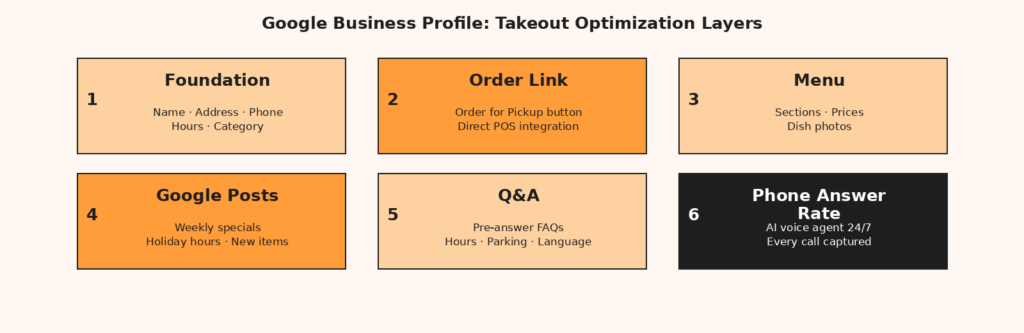
Start with the Foundation: Complete Every Section
Before any optimization strategy, do an audit. Most restaurant GBPs have at least a few critical gaps — outdated hours, a phone number that rings to a voicemail, a description written in 2022 that doesn’t mention half the menu. Google’s own guidance is explicit: businesses with complete and accurate information are more likely to appear in relevant local searches. Incomplete profiles don’t just rank lower — they actively lose customers who arrive at your listing and can’t find what they need.
The Non-Negotiable Fields
Run through this checklist and verify each one is current and accurate. A single wrong detail — a phone number with a missing digit, hours that don’t reflect your actual closing time — can turn a ready-to-order customer into a competitor’s customer.
| GBP Field | Why It Matters for Takeout | Common Mistake |
|---|---|---|
| Phone Number | Most phone orders start from a Google “click to call” | Old number or no number listed |
| Business Hours | Hungry customers check hours before calling | Hours not updated for holidays or seasonal changes |
| Menu | Customers browse menu before deciding whether to call | Outdated menu with old prices or removed items |
| Service Options | Indicates takeout/delivery availability in search results | Takeout not marked as available |
| Business Description | Helps you rank for cuisine-specific searches | Generic or missing; no cuisine keywords |
| Primary Category | Determines which searches you appear in | Set to “Restaurant” instead of “Chinese Restaurant” |
Activate the Takeout-Specific Features
Add a Direct Order Link
This is the highest-leverage change most restaurant owners haven’t made. Google Business Profile allows you to add “Order Online” and “Order for Pickup” buttons directly to your listing. A customer searching for takeout sees your listing, clicks “Order for Pickup,” and is immediately in your ordering flow — no phone call needed, no third-party app fees. For direct ordering that avoids delivery platform commissions, this is the most cost-efficient lever available.
If you use a direct ordering platform linked to your POS, you can connect that ordering link directly. For restaurants using MenuSifu, this integration is straightforward: orders placed through your Google listing flow directly into your POS system, maintaining the same workflow as phone orders without the manual entry.
Enable Google Messaging
Many customers — especially younger diners and those for whom English is a second language — prefer to message rather than call. Google’s built-in messaging feature lets customers contact you directly from your GBP listing. Enable it, and set up a quick response to common questions (hours, parking, menu items). The message response rate becomes another engagement signal in your favor.
Mark Your Attributes Accurately
GBP attributes allow you to specify operational details that surface in filtered searches. For takeout specifically, make sure “Takeout” is marked as available. If you offer outdoor seating, check that it’s listed. If you’re bilingual (English/Mandarin), that’s worth noting in your business description. Customers searching for specific features — wheelchair accessibility, outdoor seating, specific cuisine types — may never find you unless your attributes are set correctly.
Your Menu Is a Sales Tool, Not a Legal Document
The menu section of your GBP is consistently underused. Most restaurants either have no menu uploaded, or have a menu that was last updated two years ago with items that no longer exist and prices that are no longer accurate. A potential takeout customer browsing your GBP wants to make a decision before they call — the menu is their decision support tool.
How to Use the GBP Menu Editor
Google’s built-in menu editor lets you organize items by section (appetizers, mains, lunch specials, drinks), add descriptions, and include prices. Changes typically go live within 24-48 hours. The goal isn’t a complete menu — it’s your highest-volume items, your signature dishes, and your most photogenic offerings. Make sure every item that regularly drives phone orders has a description and, where possible, a photo.
Menu Photos Drive Orders
Restaurants with high-quality photos in their GBP listings receive 42% more requests for directions and 35% more website clicks compared to listings without photos. For takeout, the dish photos in your menu section are direct sales triggers — a customer browsing for “dim sum near me” who sees a beautiful photo of your har gow is more likely to call and order than one who sees a text-only menu. Invest in one professional shoot of your top 10 dishes; the returns compound for years.
Google Posts: The Free Marketing Tool Nobody Uses
Google Posts are short updates — offers, announcements, new menu items, limited-time specials — that appear directly in your GBP listing on Google Search and Maps. Most restaurants don’t use them at all, which is precisely why using them creates differentiation. A competitor with the same star rating who posts weekly specials signals an active, engaged business. The customer comparing two listings often defaults to the one that looks more alive.
For takeout businesses, the highest-converting post types are: new menu items (with photo), limited-time specials, and holiday hours changes. Keep the copy short — 1-2 sentences — and include a CTA button (“Order Now,” “Call Now”). Post once per week during the active business season; less is fine, but zero is a missed opportunity.
The Q&A Section: Answer Before They Ask
Google’s Q&A feature allows anyone to ask a question on your listing — and anyone to answer it. Left unmanaged, this section either fills with unanswered questions or, worse, gets answered incorrectly by well-meaning strangers. Take control by proactively seeding it with the questions your staff fields every day: “Do you have parking?”, “Are you open for lunch?”, “Do you accept credit cards?”, “Can I order in Mandarin?”
Answer these questions yourself through your GBP owner account. They appear in your listing and reduce the friction for customers who might otherwise give up rather than call to ask. A customer who gets every question answered in your GBP listing is a customer who calls to order, not to ask questions — which is exactly the kind of efficient, high-conversion interaction that improves your ranking signals. Find more detail on building a comprehensive GBP strategy at the Tunvo About page, where we discuss the intersection of AI voice ordering and digital presence.
Phone Responsiveness: The GBP Signal You’re Probably Missing
Everything above assumes that when a customer finds your profile and clicks “Call,” someone answers. If they don’t — especially during peak hours when your listing generates the most traffic — you’ve optimized for discovery and then failed at conversion. Google’s own research indicates that accurate contact details and responsive communication are core to what makes a local listing trustworthy and rankable.
For Chinese restaurants handling high phone order volume, the most effective solution to the peak-hour missed call problem is an AI voice agent that answers every call on the first ring, takes orders in English and Mandarin, and sends them directly to your POS. Tunvo’s AI voice agent integrates directly with MenuSifu, meaning every order placed through your GBP’s “click to call” is captured, processed, and printed — whether it’s noon on Tuesday or 9 PM on a Friday. See our pricing page for a full breakdown of what’s included.
Frequently Asked Questions
How often should I update my Google Business Profile?
Audit the core fields — hours, phone number, menu, photos — at least monthly. For seasonal changes, holiday hours, and new menu items, update in real time. Google actively monitors for profile freshness, and continuously updating your profile is one of the signals that keeps you competitive in local search. Set a monthly calendar reminder for your “GBP check-up.”
Do I need professional photos, or are phone photos acceptable?
Professional photos are ideal for your top dishes, but modern smartphones — especially in good natural light — produce photos that perform well on GBP. The most important factor is clarity and lighting, not camera equipment. What doesn’t work: blurry shots, photos with no dishes visible, or stock images. What works: bright, well-lit photos of your actual menu items as they’re served.
Should I link my GBP to a third-party delivery platform or my own ordering system?
Where possible, link to your own direct ordering system to avoid third-party platform commissions (typically 25–30% of order value). If you use a direct ordering tool that integrates with your POS — such as a MenuSifu-linked system — that’s the preferred connection. Third-party links are acceptable if direct ordering isn’t available, but the commission math makes direct ordering worth the setup investment.
Your GBP gets customers to the phone. Tunvo makes sure the phone is always answered. AI voice ordering in English and Mandarin, direct MenuSifu POS integration, setup in 30 minutes.