You already know which dishes make you the most money. The question is whether your menu is actually guiding customers toward them — or just listing everything in alphabetical order and hoping for the best. The gap between those two approaches can be the difference between a comfortable margin and a stressful one.
In this guide, we’ll walk through the specific design and layout techniques that direct customer attention toward high-margin items. None of these require expensive reprints or a graphic designer. Most can be implemented the next time your menu goes to the printer — or right now, if you’re managing an online ordering platform.
Key Takeaways
- Where you place a dish on the menu is as important as how you describe it.
- Visual callouts — boxes, icons, bold type — can significantly increase orders on targeted items.
- Anchor pricing makes your most profitable dishes look like the sensible choice.
- Consistency across physical and digital menus is critical for maximum effect.
The Foundation: Know Your High-Margin Items First
Before you can highlight the right dishes, you need to know which dishes deserve highlighting. A “high-margin” item isn’t necessarily your most expensive — it’s the one where the gap between what the customer pays and what it costs you to make is widest, multiplied by how often it sells.
According to Meez, contribution margin is the most useful metric here — it shows the real dollar amount each item contributes to your bottom line rather than just the percentage ratio. A $12 noodle dish that costs $3 to make and gets ordered 200 times a month generates more total contribution than a $30 seafood entrée that costs $22 and sells 40 times. Know which items are doing the heavy lifting, then design your menu around them.
Placement: Prime Real Estate on Your Menu
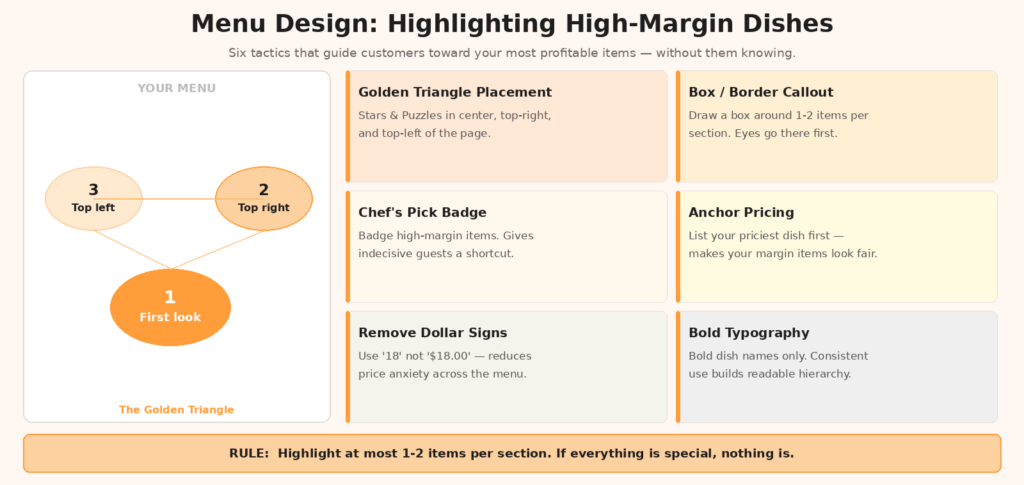
Eye-tracking studies consistently show that customers don’t read menus the way they read a newspaper. The scanning pattern follows what researchers call the “golden triangle”: first the center of the page, then the top right, then the top left. These three zones receive the most visual attention — which means items positioned there have a natural head start in the ordering decision.
Position High-Margin Items in the Golden Triangle
Menubly confirms that high-profit dishes should occupy the top-right corner or center of each menu section, where they receive maximum visual attention. For a Chinese restaurant with multiple sections — cold appetizers, dumplings, wok dishes, seafood — the first one or two items in each section receive disproportionate attention. Put your most profitable items there, not your most expensive ones.
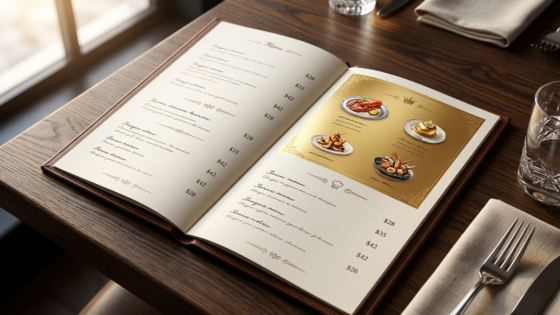
For single-page menus with a left-right spread, the right-hand page is prime real estate. Customers naturally spend more time there. Use it for your highest-margin entrées or signature items.
Use Serial Position to Your Advantage
Research on how people read lists shows that items at the beginning and end of a list are remembered and chosen more often than items in the middle — what psychologists call the “serial position effect.” One study found that 35% of diners order the very first item in a category, which means your opening item in each section carries enormous ordering weight. Use that position deliberately.
Visual Callouts: Making the Right Items Stand Out
Once you’ve placed your high-margin items strategically, reinforce their visibility with design elements. The goal is to interrupt the scanning pattern and direct the eye — but with a light touch.
Boxes and Borders
A simple box drawn around a dish description is one of the most effective and most underused tools in menu design. Baker Tilly identifies boxed sections as a proven technique to draw attention to high-margin items in a way that feels natural rather than promotional. A box signals “this is notable” without requiring any additional copy. Pair it with a subtle shaded background in your brand color for even more visibility.
Icons and Badges
Small icons — a star for “Chef’s Recommendation,” a flame for “Most Popular,” a house icon for “House Specialty” — give indecisive customers a shortcut. When someone isn’t sure what to order, they frequently default to whatever looks endorsed. Use this instinct deliberately. Just make sure the endorsed items are actually your high-margin dishes, not whichever ones have the best photos.
Research on decision fatigue shows that visual shortcuts like these help customers make confident choices faster, which actually increases satisfaction. A customer who quickly decides on a “House Special” often feels better about their meal than one who deliberated for 10 minutes and second-guessed themselves throughout.
Typography and Color Contrast
Bold text, larger font size, or a slightly different color for a dish name all create hierarchy on the page. You don’t need a full redesign to implement this — even bolding the name of two or three high-margin items per section creates a natural reading hierarchy that guides the eye. Be consistent: every time you use a visual signal, use it for a high-margin item. If you bold random dishes, the signal loses its meaning.
The Limits of Visual Emphasis
There’s an important ceiling to this technique. ChowNow notes that visual cues only work when used sparingly — if everything is highlighted, nothing stands out. A menu with boxes around every item, bold text on every dish, and icons next to half the menu creates visual noise rather than visual hierarchy. Limit callouts to one or two items per section maximum.
Pricing Design: Anchors, Decoys, and Format
How you present prices shapes how customers feel about what they’re spending. A few adjustments here can meaningfully shift ordering behavior.
Anchor Pricing
Place one premium item at the top of each major section. This “anchor” item makes everything below it feel more reasonably priced by comparison. A $68 whole fish at the top of the seafood section makes the $34 steamed snapper look like a smart, attainable choice — even though $34 is still a high-margin item. Strategic anchoring is cited as one of the key pricing techniques for guiding customers toward mid-to-high-margin choices.
The anchor doesn’t need to sell frequently — its job is to shift the customer’s price reference point. Even if only 5% of tables order the premium item, the other 95% are now more comfortable with the $28–$38 range that makes up your best-margin tier.
Remove Dollar Signs and Align Prices Naturally
A right-aligned column of prices invites customers to scan from cheapest to most expensive — which is rarely the ordering behavior you want. Instead, embed prices in the text after the description, using plain numerals without the dollar sign. This reduces the psychological “pain of paying” and keeps attention on the dish rather than the cost.
Avoid Pricing Isolation
Dishes with prices listed in isolation — just “Kung Pao Chicken … $16” — make comparison easy and make customers price-sensitive. Dishes embedded in a rich, sensory description followed by the price as a footnote make customers think about the dish first and the cost second. Which brings us to the next technique.
Connecting Design to Descriptions and Staff Training
Menu design doesn’t operate in isolation. Visual callouts and strategic placement are most effective when paired with compelling descriptions that tell customers why the item is worth choosing — and staff who can confidently reinforce those choices verbally.
| Design Technique | What It Does | Best Applied To |
|---|---|---|
| Golden Triangle Placement | Ensures high-margin items are seen first | Top-ranked items in each section |
| Boxed Callout | Draws the eye and signals importance | One item per section, usually a Puzzle or Star |
| Chef’s Recommendation Icon | Provides a decision shortcut for uncertain diners | High-margin items that aren’t yet top sellers |
| Anchor Item | Shifts price reference point upward | Top of each major entrée or protein section |
| No Dollar Sign | Reduces price anxiety across the whole menu | Entire menu — especially mid-to-upscale restaurants |
Brief your staff on which items you want to sell. A server who genuinely recommends your house braised pork belly when a customer asks “what’s good?” is the most effective marketing channel you have. Design gets customers to consider a dish; staff enthusiasm closes the sale. See the Tunvo pricing page for information on how Tunvo’s AI handles phone-based recommendations during the ordering conversation.
Applying These Techniques to Online and Phone Orders
Everything above applies equally to your digital menu — and arguably matters more there, since customers browsing an online ordering platform don’t have a server to guide them. On delivery platforms like DoorDash or your own website, make sure your high-margin items appear at the top of each category, have photos, and carry strong descriptions.
For phone orders, the dynamic is different. Staff may upsell inconsistently depending on how busy the shift is, what they remember, or how the conversation flows. An AI voice agent like Tunvo can be configured to mention add-ons and high-margin side dishes during the ordering conversation, consistently, on every call — a reliable way to extend your menu engineering strategy to every phone interaction.
Frequently Asked Questions
How many items should I highlight per section?
One to two per section is the sweet spot. Any more and the visual hierarchy breaks down — everything highlighted means nothing is highlighted. Focus your callouts on Puzzles (high-margin, underperforming) and confirmed Stars (high-margin, already popular) to protect them from being overlooked when you eventually raise prices slightly.
Does this work on a digital menu or just print?
Both. On digital menus, the same principles apply: positioning items first in each category list, using “Featured” or “Popular” tags, and ensuring high-margin items have photos (since photos dramatically increase click-through rates on ordering platforms). The mechanics differ slightly, but the psychology is the same.
What if my highest-margin items are specialty dishes customers aren’t familiar with?
This is exactly when good descriptions matter most. Pair strong placement with a description that makes the dish sound approachable and appetizing — use sensory language, mention familiar flavor profiles, and give it a compelling name. Many high-margin dishes are unfamiliar precisely because they’ve never been properly introduced to customers.
Great menu design only works when customers can actually place their order. Tunvo’s AI voice agent ensures every phone call gets answered, every order is captured accurately, and your high-margin items are available to every caller. Start your free trial or book a demo to see it in action.