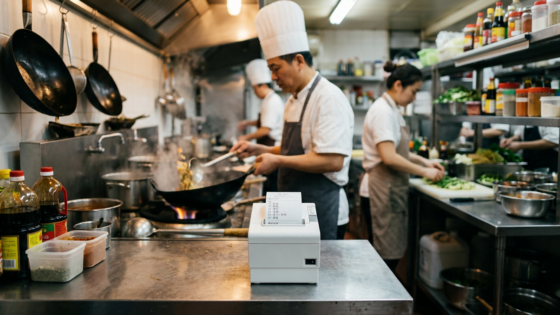
When restaurant owners in New York’s Chinatown ask me about using an AI phone agent, one of the first questions that comes up is never about accuracy rates or integration timelines. It’s simpler than that: “Will it print in Chinese?” The question matters a lot. Most of the kitchen staff in these restaurants work faster and make fewer mistakes when orders appear in Chinese rather than romanized or English-only text. Getting this wrong — even with a great AI system — creates friction in exactly the place you’re trying to eliminate it.
The short answer is yes, AI voice agents can absolutely produce Chinese-character kitchen tickets. But whether that actually happens at your restaurant depends on a combination of factors: how your POS handles language output, what printer hardware you’re running, and how the AI sends structured order data to that printer. This guide breaks each piece down so you can make an informed decision — and stop worrying that going AI means going English-only in the kitchen.
Key Takeaways
- Modern thermal printers from Epson, Citizen, and others support Simplified and Traditional Chinese via UTF-8 or GB2312 encoding — the hardware limitation is largely solved.
- The real bottleneck is your POS — a bilingual POS like MenuSifu handles Chinese kitchen output natively; generic systems often don’t.
- AI voice agents don’t print directly — they capture the order and pass it to your POS, which then routes to the printer. The AI’s job is order accuracy; the POS and printer handle language.
- When an AI is deeply integrated with a bilingual POS — like Tunvo’s integration with MenuSifu — the entire chain from phone call to kitchen ticket can operate in Chinese.
How Kitchen Ticket Printing Actually Works
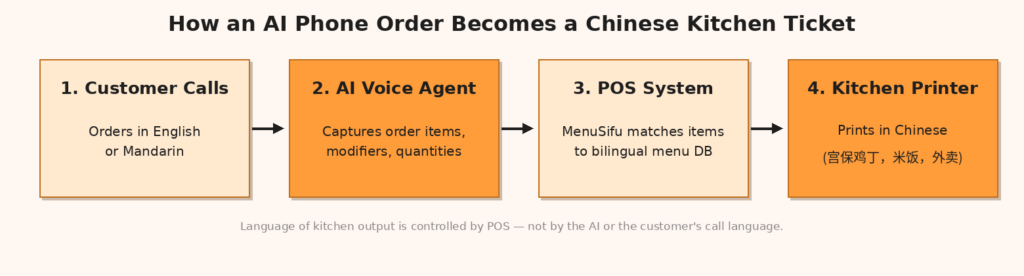
There’s a common misconception that an AI phone agent “talks to the printer.” It doesn’t. The workflow involves three separate layers, and understanding this makes the Chinese-character question much easier to answer.
Layer 1: The AI Voice Agent
When a customer calls and places an order over the phone, the AI captures their request — items, quantities, modifications like “no scallion” or “extra spicy” — and converts it into structured order data. This is where language recognition matters most. A good AI agent needs to understand both Chinese and English, since many New York Chinese restaurant customers order in one language while the kitchen operates in another. Tunvo’s AI, for instance, handles calls in both English and Mandarin, capturing every modifier accurately before passing a clean, structured order downstream.
Layer 2: The POS System
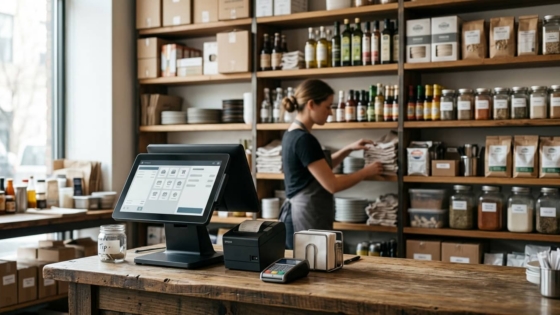
The structured order data lands in the POS. This is the critical junction for Chinese printing. If the POS supports bilingual output — storing menu items in both Chinese and English simultaneously — then any downstream printer that supports Chinese encoding will receive Chinese text. If the POS only stores menu items in English, it can only send English to the printer, regardless of what printer you have.
MenuSifu, the POS Tunvo integrates with, is built specifically for this use case. As MenuSifu explains on their site, giving kitchen staff clear instructions in their language is critical to reducing errors — and their system stores menu data in multiple languages simultaneously, routing the appropriate language to each station. A server-facing screen can show English while the kitchen ticket prints in Chinese from the same order.
Layer 3: The Printer Hardware
Even with a bilingual POS, your printer must be capable of rendering Chinese characters. This is a firmware and encoding question, not just a language setting. We’ll cover this in detail in the next section.
Which Printers Support Chinese Characters?
The good news: if you bought your kitchen printer in the last several years from a major brand, it almost certainly supports Chinese character printing. The question is whether it’s configured correctly and whether your POS is sending the right encoding.
Character Encoding: What It Means in Practice
Chinese characters require a specific encoding scheme that the printer firmware must recognize. The two most common for restaurant use are GB2312/GBK (Simplified Chinese, common in mainland-origin restaurants) and Big5 (Traditional Chinese, common in Cantonese-speaking or Taiwanese restaurants). Most modern printers also support UTF-8, which covers both character sets and is the preferred encoding for newer cloud-based POS systems.
When a POS sends an order to the printer, it transmits bytes of data along with a command telling the printer which encoding to interpret. If the encoding command and the actual character data don’t match, you get printed gibberish — a problem restaurant owners sometimes describe as “the printer is broken” when it’s actually a configuration mismatch.
Printer Hardware Comparison
| Printer Brand/Model | Chinese Character Support | Encoding | Notes |
|---|---|---|---|
| Epson TM-T88VI+ | ✅ Yes | Simplified Chinese, UTF-8 | Requires firmware update on TM-T88V and lower |
| Citizen CT-S4500 | ✅ Yes | Simplified + Traditional Chinese, UTF-8 | Also supports Japanese, Korean Hangul |
| Citizen CT-S801III | ✅ Yes | Simplified + Traditional Chinese, UTF-8 | Kitchen-optimized, high durability |
| POSTRON Thermal Printer | ✅ Yes | Chinese + multiple languages | Purpose-built for restaurant use with alarm function |
| Generic/Older ESC/POS printers | ⚠️ Varies | Depends on firmware | Check manufacturer specs; may print gibberish without correct configuration |
The Configuration Step Most Restaurants Miss
Even with a capable printer, Chinese characters often fail to print because no one has explicitly set the character encoding in the POS printer settings. The printer defaults to the Latin character set (CP-1252 for US markets), and Chinese characters come out as question marks or corrupted symbols. This isn’t a hardware failure — it’s a one-time configuration that your POS provider or installer should handle during setup. If you’re using MenuSifu, this is part of their standard installation and their 24/7 bilingual support can walk you through it on any existing hardware.
What “No POS” Restaurants Need to Know
Not every Chinese restaurant runs a full POS system. Many smaller operations — especially takeout-focused spots that rely heavily on phone orders — use a standalone receipt printer connected directly to a phone or tablet. This setup is simpler but has different considerations for Chinese printing.
Direct Printer Integration
For restaurants without a POS, Tunvo’s AI voice agent supports direct printer output — meaning orders can go straight to a connected printer rather than routing through a POS system. In this scenario, the question of Chinese printing depends on: (1) whether the printer supports Chinese encoding, and (2) how the menu items are configured in Tunvo’s system. When you set up your menu in Tunvo, you can configure item names in both English and Chinese, and the system will use the Chinese names on printer output.
This matters more than it might seem. A kitchen ticket that reads “宫保鸡丁 (Kung Pao Chicken)” is far more useful to a Mandarin-speaking cook than one that says “Kung Pao Chicken — no peanuts — extra spicy.” The Chinese name reduces interpretation time during a dinner rush when every second counts.
Practical Setup Recommendation
Tunvo can be set up in about 30 minutes for either integration path — POS-connected or direct printer. During onboarding, you’ll configure your menu in the system. It’s worth spending a few extra minutes at this stage to enter Chinese character names for your most common items, especially dishes with complex modifiers like spice level or cooking style. This investment of time up front means your kitchen staff reads tickets in their primary language from day one.
Why This Matters Beyond Convenience
The practical case for Chinese kitchen tickets isn’t just about preference — it directly affects order accuracy and kitchen speed. When kitchen staff read tickets in English that they’re processing as a second language, the cognitive overhead adds up. A ticket that says “beef with broccoli, no garlic, light sauce, add ginger” requires translation in the cook’s head before action. The same ticket in Chinese eliminates that step.
Research on restaurant order accuracy shows that digital ordering systems can reduce order errors by up to 30% compared to handwritten or verbal communication — and that benefit compounds when the output language matches the kitchen staff’s primary language. The accuracy gains are highest when every link in the chain — AI capture, POS processing, and kitchen output — works in the same language workflow.
“In our visits to Chinese restaurants around New York, one pattern keeps coming up: owners who switched to bilingual kitchen tickets report fewer remakes during peak hours. Not because the food changed — because the communication did.”
— Kevin Liu, Head of North America Sales, Tunvo
According to Tunvo, the AI achieves 95%+ order accuracy on phone orders. But accuracy on capture is only useful if the downstream communication — including the kitchen ticket — preserves that accuracy without introducing new errors from language translation or illegible handwriting.
The MenuSifu + Tunvo Combination
For Chinese restaurants already running MenuSifu — or considering it — the integration with Tunvo is designed to make this entire workflow seamless. MenuSifu’s platform was built specifically for Chinese restaurants, with bilingual support across every touchpoint: customer-facing menus, staff interfaces, kitchen display systems, and printer output. When Tunvo captures a phone order and pushes it into MenuSifu, the POS already knows to route Chinese characters to kitchen printers and English to customer-facing receipts.
This isn’t a feature you configure after deployment — it’s how the system works by default. For an owner managing a busy dinner shift, that means one less thing to think about. The AI handles the phone. MenuSifu handles the routing. The kitchen staff sees exactly what they need in the language they work in.
If you’re currently using MenuSifu and want to see the full phone-to-kitchen-ticket flow demonstrated with your actual menu, you can book a demo with the Tunvo team — setup takes about 30 minutes, and the demo includes a live test call to show what your kitchen tickets will actually look like.
Frequently Asked Questions
Does Tunvo’s AI voice agent understand Chinese when customers call?
Yes. Tunvo’s AI handles calls in both English and Mandarin, making it suitable for Chinese restaurants whose customer base spans both languages. Orders captured in either language are structured the same way before being sent to the POS or printer.
What if my current printer doesn’t support Chinese characters?
First, check your printer’s spec sheet — many owners don’t realize their existing hardware already supports Chinese encoding and just needs to be configured correctly. If your printer genuinely lacks Chinese character support (common with older or very low-cost models), replacement printers with full bilingual support are widely available and not significantly more expensive than standard ESC/POS printers.
Can AI orders print in Cantonese characters, not just Simplified Chinese?
This depends on how your menu items are configured in the system. If you set up your menu items with Traditional Chinese characters (used in Cantonese-speaking restaurants), those characters will appear on kitchen tickets, provided your printer supports Traditional Chinese encoding. Most modern printers — including Citizen’s restaurant-grade models — support both Simplified and Traditional Chinese simultaneously.
Do I need a technician to configure Chinese printing, or can I do it myself?
For most MenuSifu setups, the bilingual configuration is handled during installation. For direct-printer setups or restaurants making changes to existing configurations, Tunvo’s onboarding walks you through the setup. MenuSifu also offers 24/7 bilingual technical support if you run into printer configuration questions post-setup.
What happens to the kitchen ticket if a customer orders in English but I want Chinese output?
This is handled at the POS level, not the AI level. When Tunvo sends the order to MenuSifu, the POS matches the order items against your menu database. Since MenuSifu stores each menu item in multiple languages, it knows the Chinese name for “Kung Pao Chicken” regardless of which language the customer used when ordering. The kitchen ticket language is a POS output setting, not something the customer or the AI controls.
Every missed call is a missed order. Every order that reaches the kitchen with the wrong language adds friction that slows your team down. Tunvo’s AI voice agent handles every call in English and Mandarin — and when paired with MenuSifu, your kitchen tickets print in whatever language your team works best in.
Get started in 30 minutes. Book a Demo or Start Your 15-Day Free Trial.